Best WooCommerce Plugins to Increase Sales (2026): 12 Picks by Job

The best WooCommerce plugins to increase sales each do one job: show that other people buy from you, give shoppers a reason to buy now, bring back the ones who leave, raise the order value, and keep the checkout fast. This list has 12 plugins grouped by those jobs. ProveSource and ProveSource Boost are ours, and they lead the trust and urgency groups. The other ten are the plugins we would install beside them.
If you are setting up a new store and want the short version, the starter stack further down is five plugins, and every one of them has a free version.
How we picked
Every fact about a plugin on this page was read on 23 November 2026 from its wordpress.org listing or from the vendor’s own pricing and documentation pages. Where a price was discounted for Black Friday on that date, we give the list price and say so.
Three rules decided what made the list:
- One plugin per job. A store with three popup plugins and two cache plugins is slower and harder to debug than a store with one of each.
- A free version first. Eleven of the twelve picks have a free version or a free plan. Where the job itself needs a paid plan, the section says so.
- Still maintained. The eleven plugins that are on wordpress.org were all updated between 28 September and 19 November 2026, and each listing says it is tested up to WordPress 7.1.5. WooCommerce itself was at version 11.3.1 on the day we checked.
We did not install all twelve on one test store and measure the lift. What a plugin does for your sales depends on your traffic and your products, so treat each pick as a candidate to test.
Trust and social proof
A first-time visitor has no way to know whether your store ships what it shows. Two things answer that on the page: other people buying, and other people’s reviews.
1. ProveSource
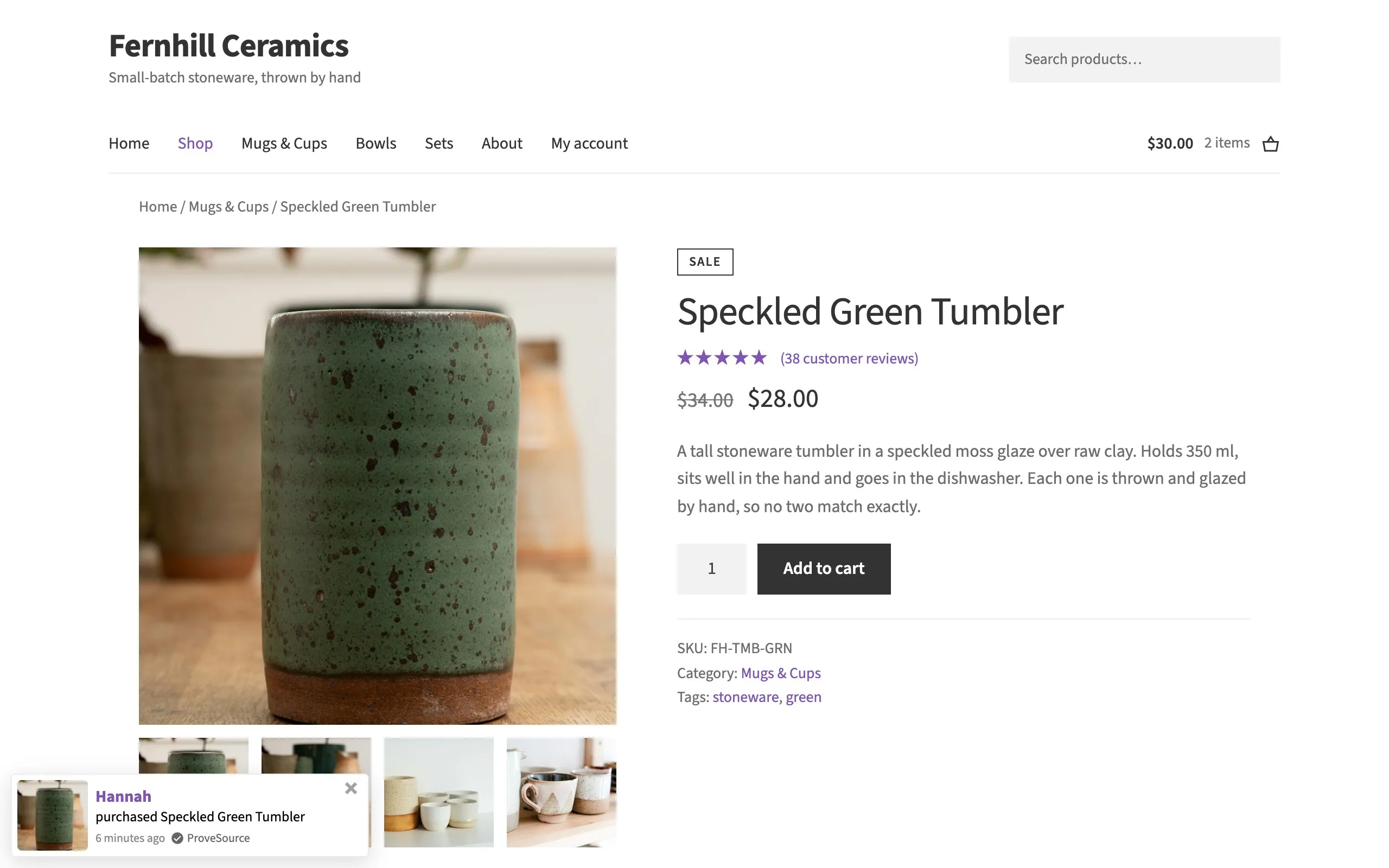
ProveSource is our own product, so read this section with that in mind. It shows small notifications in the corner of the page: someone in Austin bought the Linen Overshirt three minutes ago, 14 people are looking at this product, 212 orders came in this week.
When you connect the plugin it imports your last 30 WooCommerce orders, so the first notification has something to show right away. After that each new order is sent in the background. Failed, cancelled and refunded orders are never sent, so the notifications only show real orders. The plugin also syncs your latest 100 approved product reviews and can show them as notifications.

- On wordpress.org: version 5.0.0, updated 28 September 2026
- Free plan: 1,000 unique visitors a month with every feature, plus a small ProveSource badge
- Paid: Starter is $29 a month, or $24 a month billed yearly, for 20,000 visitors. See pricing
- Job: recent sales, live visitor counts, order totals and review notifications
The WooCommerce setup page has the install steps, and the recent sales playbook covers the notification most stores start with. If you want to compare it with other tools that do this job, we wrote a separate list of social proof plugins for WordPress and WooCommerce.
2. Customer Reviews for WooCommerce
WooCommerce has product reviews built in, but it does not ask anyone to write one. Customer Reviews for WooCommerce by CusRev sends an automated email after an order is marked completed, with a form where the customer can review everything they bought on one page. Its listing also names photo and video reviews, a questions and answers section on product pages, a review summary bar, and a discount code sent as a thank-you.
- On wordpress.org: version 5.129.0, updated 15 November 2026, 80,000+ active installs
- Free plan: the Basic plan, which CusRev’s pricing page describes as free forever
- Paid: Professional is $59.99 a year or $7.99 a month, plus VAT
- Job: collecting product reviews and showing them on product pages
Once reviews are coming in, ProveSource can show the good ones as notifications on other pages, which is how a review left on one product helps sell the next one.
Urgency
A discount with no end date gets saved for later. A deadline the shopper can see is what moves the order to today, as long as the deadline is real. Our post on creating urgency without being pushy covers where the line is.
3. ProveSource Boost
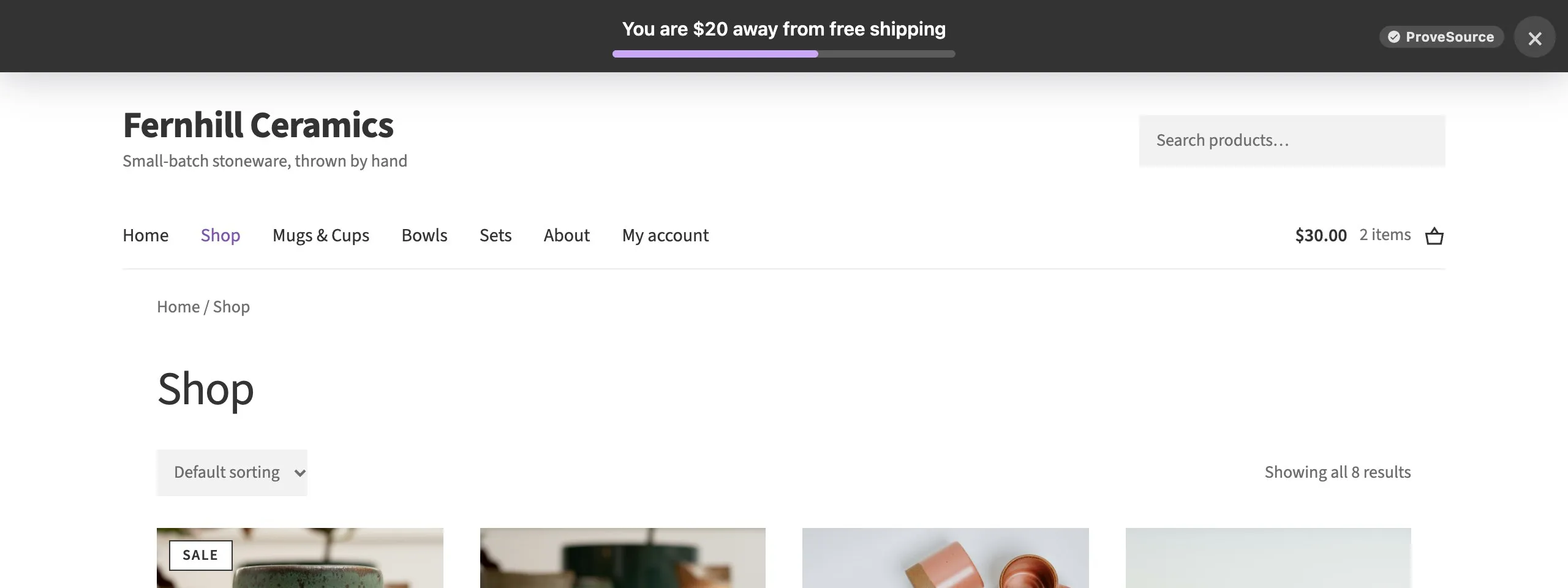
ProveSource Boost is also ours. It is a separate product from ProveSource with its own plugin, and both plugins can run on one site. Boost adds the widgets a sale needs: a countdown timer inside the page, an announcement bar pinned to the top or bottom with an optional countdown, email popups, and a spin the wheel game.
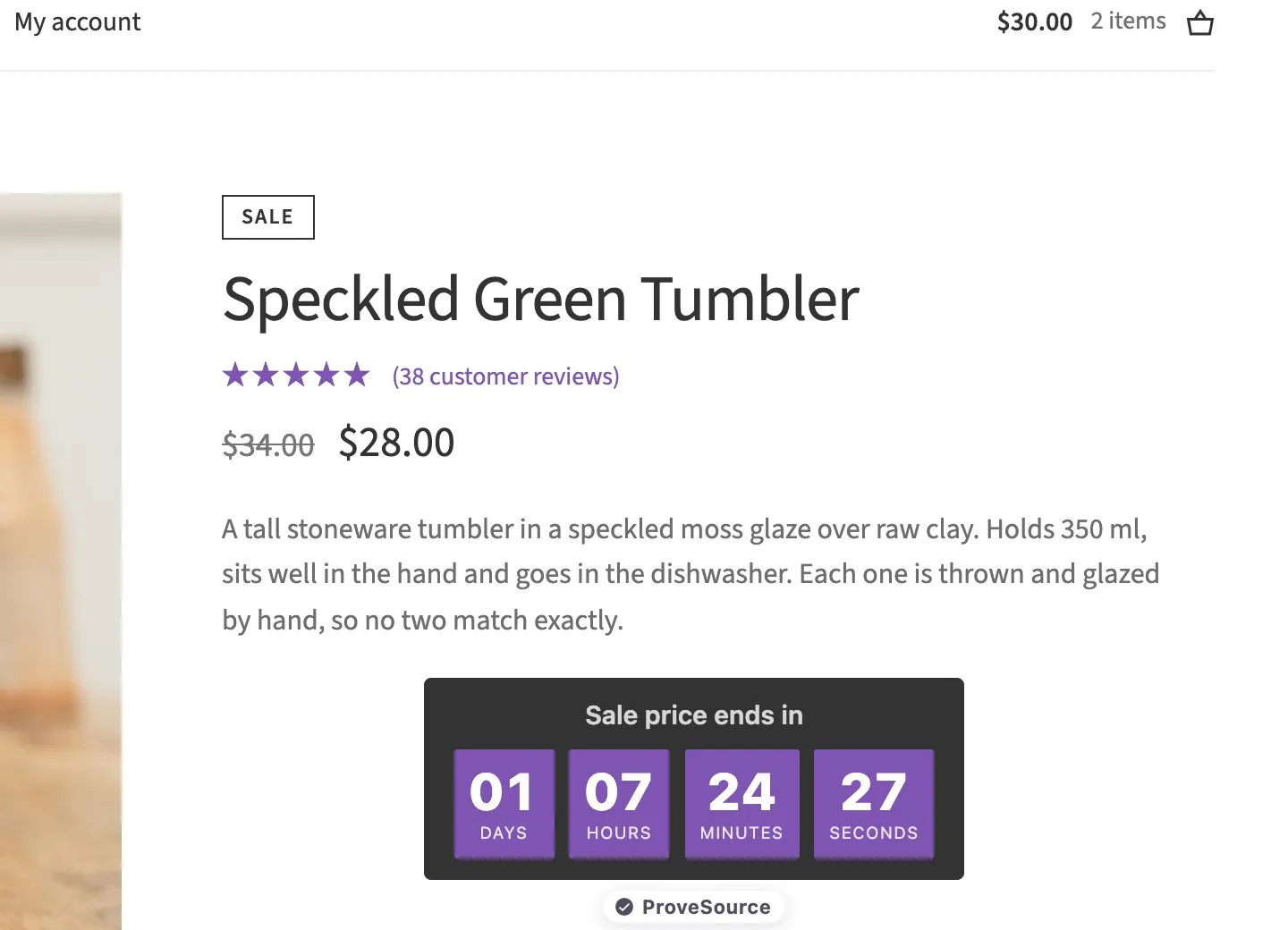
A timer can count down to one date for everyone, or start when each visitor first arrives. On WordPress you place it with the Boost Widget block, an Elementor element or a shortcode, so it can sit next to the price on a product page.
- On wordpress.org: version 1.0.2, updated 15 October 2026
- Free plan: 3 widgets and 1,000 widget views a month, every widget type, unlimited leads, with a small ProveSource badge
- Paid: Pro is $24 a month or $195 a year for unlimited widgets and views and no badge
- Job: countdown timers, sale and free shipping bars, popups
Low stock messages are built into WooCommerce
You do not need a plugin to show that a product is running out. In WooCommerce, go to Settings, Products, Inventory, and set Stock Display Format to “Only show stock when low”. WooCommerce’s documentation gives the result as “Only 2 left in stock” in place of “In stock”. The Low Stock Threshold on the same screen sets what counts as low. It needs stock management turned on, and it shows your real count.
Cart recovery and email capture
Some shoppers leave before they reach the checkout, and some leave in the middle of it. Each group needs a different tool.
Exit-intent and email popups
For visitors who have not reached the checkout, the tool is a popup that trades a discount code for an email address. This is Boost again, so it does not get its own number. A popup can open after a delay, on scroll, or on exit intent, when the visitor moves to leave the page. Our guide to exit-intent popups explains how that works on desktop and on phones.
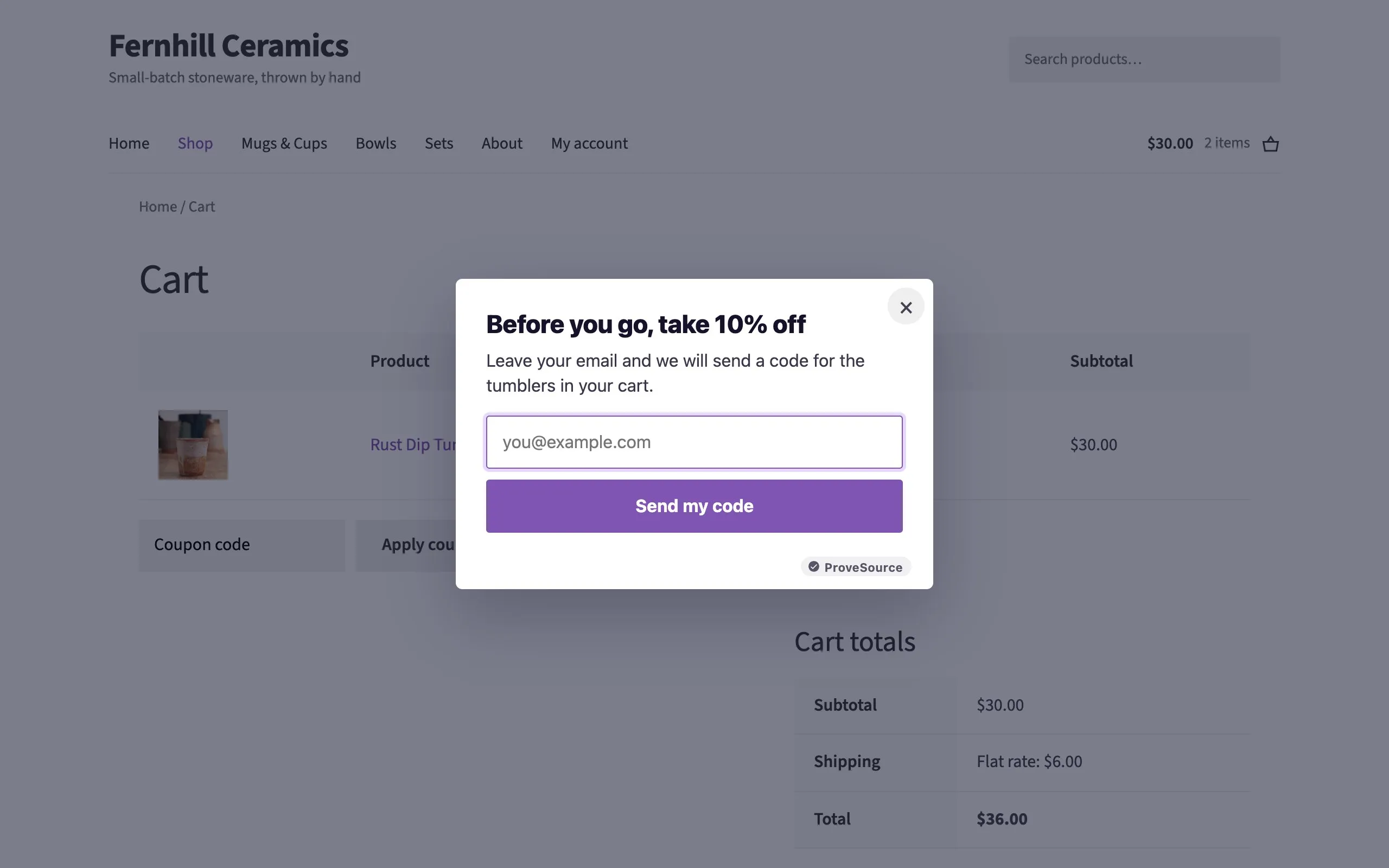
Two details matter on WooCommerce. With “Apply it at checkout” turned on, the Boost plugin puts the code the visitor received into their cart, and if the cart is empty the code waits for the first product they add. It only applies codes that exist as coupons in your store. Each lead can also be emailed to you, added to a Klaviyo list or sent to a webhook. The free popup generator page shows the popup types.
4. Cart Abandonment Recovery for WooCommerce
Cart Abandonment Recovery by Brainstorm Force handles the shoppers who started the checkout. It captures the email address as soon as it is typed into the checkout form, then sends a series of emails at intervals you set, such as 15 minutes, 1 hour and 24 hours. Each email carries a link that restores the exact cart, and can include a unique, time-limited coupon.
- On wordpress.org: version 2.2.2, updated 26 October 2026, 300,000+ active installs
- Free plan: the free plugin covers the capture, the email series, restore links, coupons and reports
- Paid: the listing marks product-level reports, advanced email tracking, a rule engine and SMS messages as Pro
- Job: recovery emails for abandoned checkouts
The listing also describes an optional consent checkbox for the checkout page. If you sell to the EU or the UK, turn it on.
5. MailPoet
Recovery emails bring back one order. A newsletter brings customers back for the next one. MailPoet runs inside WordPress, so your list and your store are in the same admin. Its listing names WooCommerce emails for abandoned carts, first purchases, specific products and product categories, plus customer segments based on country, number of orders and amount spent.
- On wordpress.org: version 5.45.2, updated 10 November 2026, 500,000+ active installs
- Free plan: up to 500 subscribers and 5,000 emails a month, per MailPoet’s pricing page
- Paid: priced by the number of subscribers. The pricing page has a calculator, so check your own list size there
- Job: newsletters and automated WooCommerce emails
If you already send email from another tool, keep it. One email tool is enough. Boost can add its leads to a Klaviyo list directly and send them anywhere else through a webhook.
Upsells and order bumps
The cheapest sale is a second item in an order that is already happening. An order bump is a checkbox on the checkout page that adds a related product. A one-click upsell is an offer shown after payment that the customer can accept without typing their card again.
6. CartFlows
CartFlows by Brainstorm Force replaces the default WooCommerce checkout with its own page, in one, two or several steps. The free plugin includes the checkout layouts, a checkout field editor, ready-made funnel templates and tracking pixels for Google, Facebook, Pinterest, Snapchat and TikTok.
The two features this section is about are paid. The listing puts one-click upsells and downsells, dynamic order bumps and A/B split testing under CartFlows Pro.
- On wordpress.org: version 3.3.3, updated 18 November 2026, 200,000+ active installs
- Free plan: checkout replacement, field editor and templates
- Paid: plans start with Starter, listed at $149 a year for one store and discounted to $79 for Black Friday on the day we checked. It renews at $149. Check on the pricing page which plan has the upsell features you need
- Job: order bumps and post-purchase upsells
CartFlows and Cart Abandonment Recovery come from the same company.
Payments and checkout
Every plugin above sends more people to the checkout. These three decide how many of them finish.
7. WooPayments
WooPayments is WooCommerce’s own payment plugin. Customers pay by card without leaving your store, and payments, refunds, disputes and payouts show in the WordPress dashboard. There is no setup fee and no monthly fee.
- On wordpress.org: version 11.3.0, updated 11 November 2026, 800,000+ active installs
- Free plan: free to install, you pay per transaction
- Fees in the United States: 2.90% + $0.30 per card payment, plus 1.50% for a card issued in another country and 1.00% for currency conversion, per WooCommerce’s fees page
- Availability: merchants registered in 38 countries, among them the United States, Canada, the United Kingdom, Australia and the countries of the EU
- Job: card payments, Apple Pay and Google Pay
8. WooCommerce Stripe Payment Gateway
If your business is registered outside those 38 countries, or you already have a Stripe account, use the WooCommerce Stripe Payment Gateway. Its listing calls it the official plugin created by Stripe and WooCommerce, with 23 payment methods including Link, Apple Pay and Google Pay. The plugin is free and Stripe charges its own transaction fees. Stripe publishes the countries it supports.
- On wordpress.org: version 11.2.0, updated 10 November 2026, 700,000+ active installs
- Free plan: the plugin is free
- Job: card and wallet payments through your own Stripe account
Run one of the two, not both for the same payment methods.
9. Fluid Checkout Lite
Fluid Checkout Lite replaces the default checkout page with a multi-step or one-page checkout designed for phones first. It keeps your theme’s look, works with Stripe and PayPal, and if your store uses the WooCommerce Checkout block it swaps in its own form automatically.
- On wordpress.org: version 5.0.1, updated 19 November 2026, 20,000+ active installs
- Free plan: the Lite plugin, with the multi-step and one-page layouts
- Paid: Fluid Checkout PRO is listed at 129 EUR a year for one site, discounted to 99 EUR on the day we checked. It extends the design to the cart and thank-you pages and adds Google address autocomplete, a saved address book and editing the cart at checkout
- Job: a shorter, clearer checkout form
Fluid Checkout and CartFlows both replace the checkout page, so pick one. CartFlows if you want order bumps and upsells, Fluid Checkout if you only want a better form.
Speed and SEO basics
A slow product page loses the shopper before any of the plugins above get a chance. One cache plugin and one SEO plugin cover it.
10. LiteSpeed Cache
LiteSpeed Cache is free, and what you get depends on your host. Its listing splits the features in two. The general features work on any web server: image optimization, CSS and JavaScript minification, lazy loading and database cleanup. The page cache itself, and the WooCommerce support that goes with it, are in the list of LiteSpeed exclusive features, which need OpenLiteSpeed, one of LiteSpeed’s commercial products, LiteSpeed-powered hosting or the QUIC.cloud CDN.
- On wordpress.org: version 7.9.3, updated 3 November 2026, 7 million+ active installs
- Free plan: the whole plugin is free
- Job: page caching, image compression and minification on LiteSpeed hosting
Ask your host which web server you are on before you install it.
11. WP Rocket
On Apache or NGINX hosting, WP Rocket is the paid option. It is not on wordpress.org and has no free version. Its documentation says it automatically excludes the WooCommerce Cart, Checkout and My Account pages from the cache, which is the setting that breaks stores when a cache plugin gets it wrong.
- Free plan: none. The pricing page offers a 14-day trial
- Paid: the Single plan for one website is listed at $5 a month, billed yearly, and was discounted for Black Friday on the day we checked
- Job: page caching on any host
Install one cache plugin only. Two page caches on one site get in each other’s way.
12. Rank Math SEO
Rank Math SEO handles titles, meta descriptions, sitemaps and schema. For a store, its listing names automatic Product schema and Open Graph tags for WooCommerce products, noindex for hidden products, and an option to remove the product and category base from URLs.
- On wordpress.org: version 1.0.282, updated 10 November 2026, 4 million+ active installs
- Free plan: the free plugin
- Paid: Rank Math PRO is listed at $8.99 a month, billed yearly, for unlimited personal websites, and was discounted for Black Friday on the day we checked
- Job: on-page SEO and Product schema
If your store already runs Yoast SEO, stay with it. Switching SEO plugins on a live store is a migration project, and running two at once is worse than either alone.
All 12 at a glance
| # | Plugin | Job | Free version | Paid from |
|---|---|---|---|---|
| 1 | ProveSource | Recent sales and review notifications | 1,000 visitors a month, all features | $29/mo ($24 yearly) |
| 2 | Customer Reviews for WooCommerce | Collecting product reviews | Yes, Basic plan | $59.99/yr |
| 3 | ProveSource Boost | Countdown timers, bars, popups | 3 widgets, 1,000 views a month | $24/mo or $195/yr |
| 4 | Cart Abandonment Recovery | Recovery emails | Yes | Pro add-ons |
| 5 | MailPoet | Newsletters and store emails | 500 subscribers | By list size |
| 6 | CartFlows | Order bumps and upsells | Checkout only | $149/yr list |
| 7 | WooPayments | Payments | Free to install | 2.90% + $0.30 per US card payment |
| 8 | WooCommerce Stripe Payment Gateway | Payments | Free plugin | Stripe’s fees |
| 9 | Fluid Checkout Lite | Checkout form | Yes | 129 EUR/yr list |
| 10 | LiteSpeed Cache | Caching on LiteSpeed hosts | Yes, all of it | Free |
| 11 | WP Rocket | Caching on any host | No, 14-day trial | $5/mo, billed yearly |
| 12 | Rank Math SEO | SEO and Product schema | Yes | $8.99/mo, billed yearly |
Prices and limits were read on 23 November 2026. Black Friday discounts were running on several of the paid plans that week, so the list prices above are the ones that apply after the sale.
A starter stack for a new store
A new store does not need twelve plugins. These five cover trust, urgency, reviews, recovery and payment, and all five have a free version:
- ProveSource for recent sales and live visitor notifications, free up to 1,000 visitors a month.
- ProveSource Boost for one countdown timer or sale bar and one email popup, free for 3 widgets.
- Customer Reviews for WooCommerce to start asking every customer for a review from the first order.
- Cart Abandonment Recovery for the emails to shoppers who leave at checkout.
- WooPayments, or the Stripe gateway if your country is not on the WooPayments list.
A brand-new store has few orders to show. Until sales pick up, use a live visitor count or a total over a longer period, such as orders this month. A count over 30 days adds up to a bigger number than the last hour, and it is still true. If all you want is a visible count of visits on a page, our free visitor counter is one line of HTML.
Add the cache plugin once the store has real traffic, and add CartFlows when you have a second product that makes sense as an order bump.
How to add sales notifications to WooCommerce
- In WordPress, go to Plugins, Add New, search for “ProveSource”, then install and activate it.
- Click ProveSource in the admin sidebar, then Connect to ProveSource. Log in or sign up for free and approve the site.
- Leave the recommended WooCommerce order events checked. Your last 30 orders are imported when you connect.
- In the ProveSource dashboard, open Quick create and launch the recent WooCommerce orders notification.
- Open your store in a new tab and check that the notification shows on a product page.
Install the free ProveSource plugin or start free on the web. You can see the notifications on a working store first on our demo pages.
Frequently asked questions
What are the best WooCommerce plugins to increase sales?
Start with one plugin per job. ProveSource shows real recent orders and reviews, ProveSource Boost adds countdown timers and email popups, Customer Reviews for WooCommerce collects product reviews, Cart Abandonment Recovery emails shoppers who left at checkout, and WooPayments or the Stripe gateway takes the payment. All five have a free version.
Can I run a WooCommerce store on free plugins only?
For most jobs, yes. Eleven of the twelve plugins on this list have a free version or a free plan, and WP Rocket is the exception. Two jobs cost money. Order bumps and one-click upsells are in CartFlows’ paid plans, and page caching on a host without LiteSpeed needs a paid plugin such as WP Rocket.
How many WooCommerce plugins is too many?
There is no fixed number. What slows a store is what each plugin does on every page view, so one plugin that runs heavy database queries on the product page costs more than five that load a single script. Add one plugin per job, test the store’s speed before and after, and remove any plugin whose job you no longer need.
Do free plugins slow WooCommerce down?
Price has nothing to do with it. A plugin slows a store when it adds database queries, large scripts or uncached requests to every page. Hosted tools such as ProveSource and Boost load one script from a CDN after the page renders and do their work on the vendor’s servers, so the store’s own server does very little extra.
Which WooCommerce plugins matter most for Black Friday?
The ones a shopper sees in the week of the sale. A countdown timer or sale bar that shows when the offer ends, recent sales notifications that show other people are buying, and cart recovery emails for shoppers who leave at checkout. Set them up before the sale starts and test a real order.
For the sale itself, our Black Friday marketing ideas post has the offers small stores can run without a big ad budget.