Best Social Proof Plugins for WordPress and WooCommerce (2026)


The best social proof WordPress plugin for most WooCommerce stores is one that shows real orders and syncs them without Zapier. ProveSource is the pick if you want analytics, more data sources than WordPress and a free plan with every feature, and NotificationX is the strongest plugin that runs entirely inside WordPress. Below are eight plugins compared on free plans, pricing, how they get your orders, and which ones will happily show orders that never happened. Every price and plan limit was checked on October 6, 2026.
This list is about WordPress and WooCommerce only. For tools on every platform, see our list of social proof tools, and for Wix there is a separate Wix list.
What a social proof plugin does on WordPress
A social proof plugin shows visitors what other people are doing on your site. The most common format is the recent sales popup: a small card in the corner that says someone just bought a product, with their city and how long ago.

The same plugins can usually show a few more things:
- product reviews, pulled from WooCommerce or from Google
- how many people are on the page right now
- totals, like 214 orders today or 1,272 sign-ups this month
- form sign-ups, for sites that sell a service or a course

On a WooCommerce store, the useful part is the order sync. A plugin that reads your orders as they happen keeps the notifications true. A plugin that asks you to type in names and products is a different product, and we cover that below.
Plugin-native vs SaaS with a plugin
WordPress social proof plugins come in two kinds, and the difference matters more than any single feature.
Plugin-native tools run inside WordPress. NotificationX, PiWeb, Notivo and SALERT read your orders from the WooCommerce database, build the notifications on your server and serve the files from your hosting. Your order data never leaves your site, and the basics cost nothing a month. The trade-off is that every page view can add requests to your own server, and the notifications only know what WordPress knows.
SaaS with a plugin tools run on the vendor’s servers. ProveSource, TrustPulse, WiserNotify and Nudgify use the plugin to add one script tag and send each new order in the background. The vendor stores the events, applies your display rules and counts views and clicks. Your server does almost nothing, and the same account can cover a Shopify store, a Stripe checkout or a landing page builder. Pricing goes by monthly traffic.
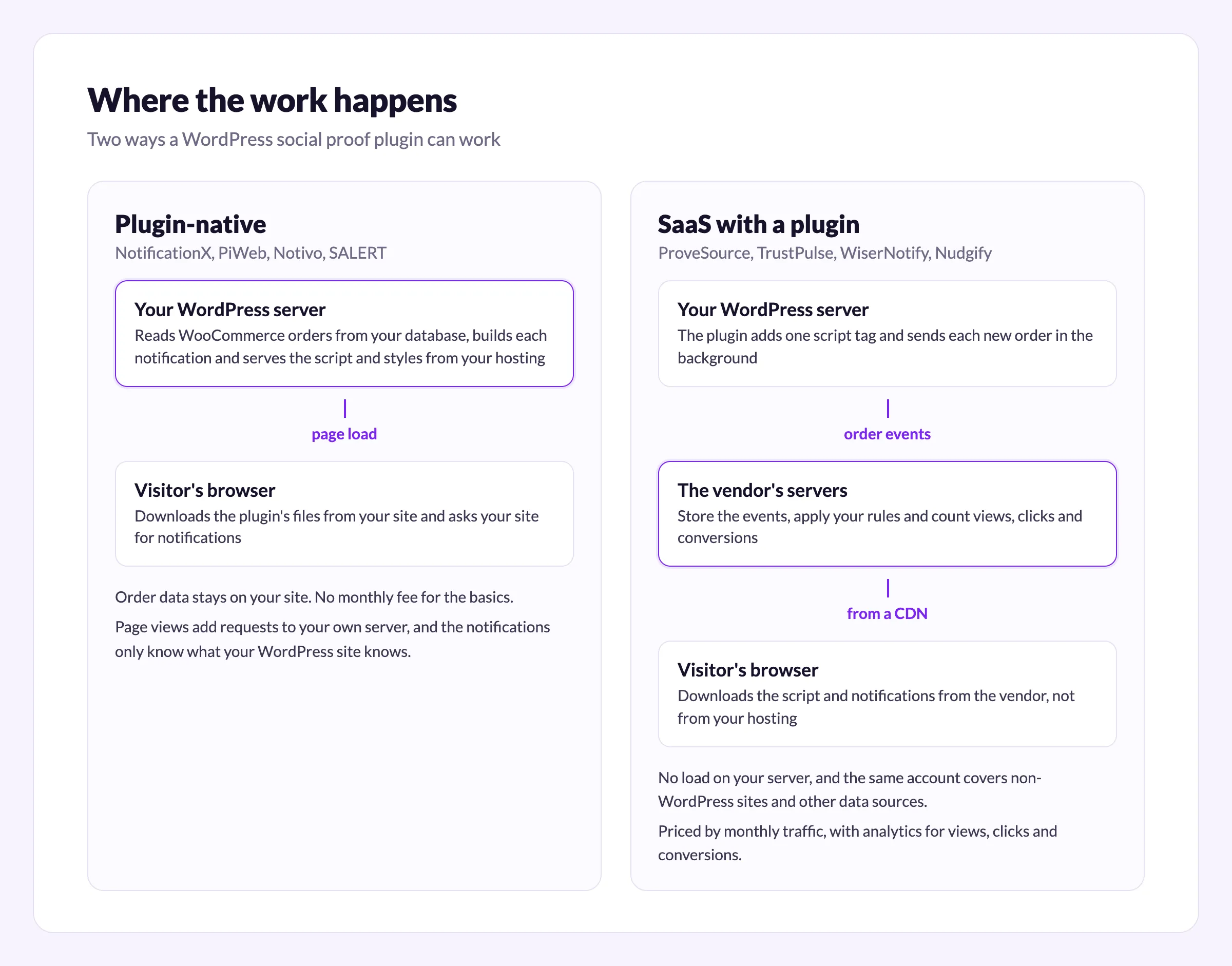
If you run one WordPress site with modest traffic and a fast host, plugin-native is fine. If you have several sites, more than one place where sales happen, or a host that struggles under load, a SaaS tool is easier to live with.
The 8 best social proof plugins for WordPress and WooCommerce
Update dates are from each plugin’s wordpress.org page and prices from each vendor’s own pricing page, all checked on October 6, 2026.
1. ProveSource
ProveSource is our own plugin, so read this section with that in mind. It is a SaaS tool: the plugin adds the script, imports your last 30 WooCommerce orders when you connect, then sends each new order in the background through WooCommerce’s Action Scheduler. Failed, cancelled and refunded orders are never sent. It also syncs your latest 100 approved product reviews and keeps them in sync when you approve, edit or delete one.
Notifications can show recent orders, product reviews, live visitor counts, totals for a day or a month, and form sign-ups. Each sales notification links to the product that was bought. Outside WooCommerce, the same account connects to Stripe, Shopify, Google reviews, Zapier and 100+ other integrations, so one setup covers a store and the marketing site in front of it.

- Last updated on wordpress.org: September 28, 2026
- Free plan: 1,000 unique visitors a month with every feature, plus a ProveSource badge
- Paid: Starter $29 a month ($24 billed yearly) for 20,000 visitors, Growth $54 a month ($45 yearly) for 50,000. See pricing
- WooCommerce orders: native, no Zapier
- Invented orders: no, it only shows real orders and reviews
2. NotificationX
NotificationX by WPDeveloper is the strongest option that runs entirely inside WordPress. The free version shows WooCommerce sales and product reviews, comments, download counts and a notification bar, with no traffic cap. Pro adds Google reviews, Zapier, Mailchimp, Gravity Forms, advanced reports and a few more sources.
- Last updated on wordpress.org: September 30, 2026
- Free plan: the free plugin, no visitor limit
- Paid: $39 a year for one site, $149 a year for unlimited sites, $279 lifetime (all shown at a discount on their pricing page)
- WooCommerce orders: native, read from your own database
- Invented orders: not in the free version
It only covers WordPress, so a store that also sells through Shopify, Stripe or a landing page builder needs a second tool for those. Our NotificationX comparison has more.
3. TrustPulse
TrustPulse is a SaaS tool with a long-standing WordPress plugin. Its pricing page lists introductory prices for annual plans only, with renewals at full price.
- Last updated on wordpress.org: August 11, 2025, tested up to WordPress 6.8
- Free plan: up to 500 sessions
- Paid: Basic $5 a month (1,500 visitors), Plus $10 (10,000), Pro $19 (25,000), Growth $39 (100,000), all billed yearly at introductory prices. Full prices are $9, $17, $34 and $50
- WooCommerce orders: native only on Pro and Growth. Basic and Plus rely on Zapier or on-page activity capture
- Invented orders: no
The plugin has not been updated in over a year, and a WooCommerce store needs the $19 Pro plan to sync orders natively. See our TrustPulse comparison.
4. WiserNotify
WiserNotify is a SaaS tool with small steps between its traffic tiers. There is no free plan, only a 7-day trial and a 14-day money-back guarantee.
- Last updated on wordpress.org: February 6, 2026
- Free plan: none
- Paid: Basic $59 a year for 5,000 visitors a month. Pro is $16 a month for 10,000 visitors and $40 a month for 50,000 ($128 and $320 a year)
- WooCommerce orders: native
- Invented orders: not that we could find
There is no free plan, so you pay from day one. More in our WiserNotify comparison.
5. Nudgify
Nudgify counts impressions rather than visitors and allows unlimited websites on every plan.
- Last updated on wordpress.org: August 13, 2026
- Free plan: 1,000 impressions a month and one review
- Paid: Lite $9 a month for 10,000 impressions, Plus $29 for 90,000, Genius $49 for 300,000
- WooCommerce orders: native, including stock levels
- Invented orders: no generator, though custom nudges can say anything you type
Its plugin FAQ on wordpress.org still describes an older per-website price, so go by the pricing page. See our Nudgify comparison.
6. PiWeb Live Sales Notification for WooCommerce
PiWeb’s plugin runs entirely in WordPress. The free version shows real orders, but only from the last day, and it can also generate “virtual orders” with made-up names and cities from products you choose.
- Last updated on wordpress.org: September 8, 2026
- Free plan: the free plugin, real orders from the last day only
- Paid: $19 a year for one site
- WooCommerce orders: native
- Invented orders: yes, in free and Pro
It is cheap. Turn off virtual orders if you use it.
7. Notivo Notification for WooCommerce
Notivo by VillaTheme is another plugin-native tool. It can show real orders from a window you choose, such as the last 30 days, but the free version is limited to two products. Premium adds unlimited products, click reports and an AI option that writes messages about virtual customers.
- Last updated on wordpress.org: September 25, 2026
- Free plan: the free plugin, up to two products
- Paid: $39 for 6 months or $69 a year, one site
- WooCommerce orders: native
- Invented orders: yes
8. SALERT
SALERT is on this list because it ranks for these searches, not because we recommend the free version. Free SALERT shows invented names, countries and products only. Real WooCommerce orders need SALERT Pro, which the vendor sells for $39 and describes as covering “real and fake” notifications.
- Last updated on wordpress.org: September 24, 2026
- Free plan: invented data only
- Paid: $39, unlimited sites
- WooCommerce orders: Pro only
- Invented orders: yes
Two you will still see in older lists
Fomo used to have a WooCommerce plugin on wordpress.org. That plugin was closed on May 7, 2026, with the reason given as a guideline violation. Fomo itself is still running, now at usefomo.com, and connects to WooCommerce through its own integration instead of a wordpress.org plugin. Pricing starts at $25 a month after a 14-day trial (usefomo.com/pricing, checked October 7, 2026). If you are comparing the two, see our Fomo comparison.
WPfomify is not on wordpress.org. Its own site still sells licences from $99 a year, but the footer reads 2022, so check that it is maintained before you buy.
Comparison table
| Plugin | How it works | Free plan | Paid from | Real WooCommerce orders | Invented orders |
|---|---|---|---|---|---|
| ProveSource | SaaS + plugin | 1,000 visitors, all features | $29/mo ($24 yearly) | Yes, native | No |
| NotificationX | Plugin-native | Yes, no traffic cap | $39/yr, 1 site | Yes, native | No (free) |
| TrustPulse | SaaS + plugin | 500 sessions | $5/mo intro, yearly | Pro plan and up | No |
| WiserNotify | SaaS + plugin | No, 7-day trial | $59/yr | Yes, native | Not found |
| Nudgify | SaaS + plugin | 1,000 impressions | $9/mo | Yes, native | Custom text only |
| PiWeb | Plugin-native | Last day’s orders only | $19/yr | Yes, native | Yes |
| Notivo | Plugin-native | 2 products | $39 for 6 months | Yes, native | Yes |
| SALERT | Plugin-native | Invented data only | $39 | Pro only | Yes |
Best pick by goal
- WooCommerce plus other sites or data sources, with analytics: ProveSource. It is free with every feature while you are under 1,000 visitors.
- Free, real orders, one WordPress store, nothing outside WordPress: NotificationX.
- Avoid: any setup that shows invented orders, including the free version of SALERT and the virtual orders options in PiWeb and Notivo.
On invented orders: in the US, the FTC’s rule on fake reviews and testimonials has been in force since October 21, 2024, and invented purchase activity falls under its general ban on deceptive practices. Beyond the legal risk, a visitor who spots one fake notification stops trusting the real ones. Our post on herd mentality covers why that trust is the whole point.
How to add sales popups to WooCommerce in 5 minutes
These are the steps for the ProveSource plugin. The WooCommerce setup page and the WordPress setup page have the same steps for other kinds of sites.
- In WordPress, go to Plugins, Add New, search for “ProveSource”, then install and activate it.
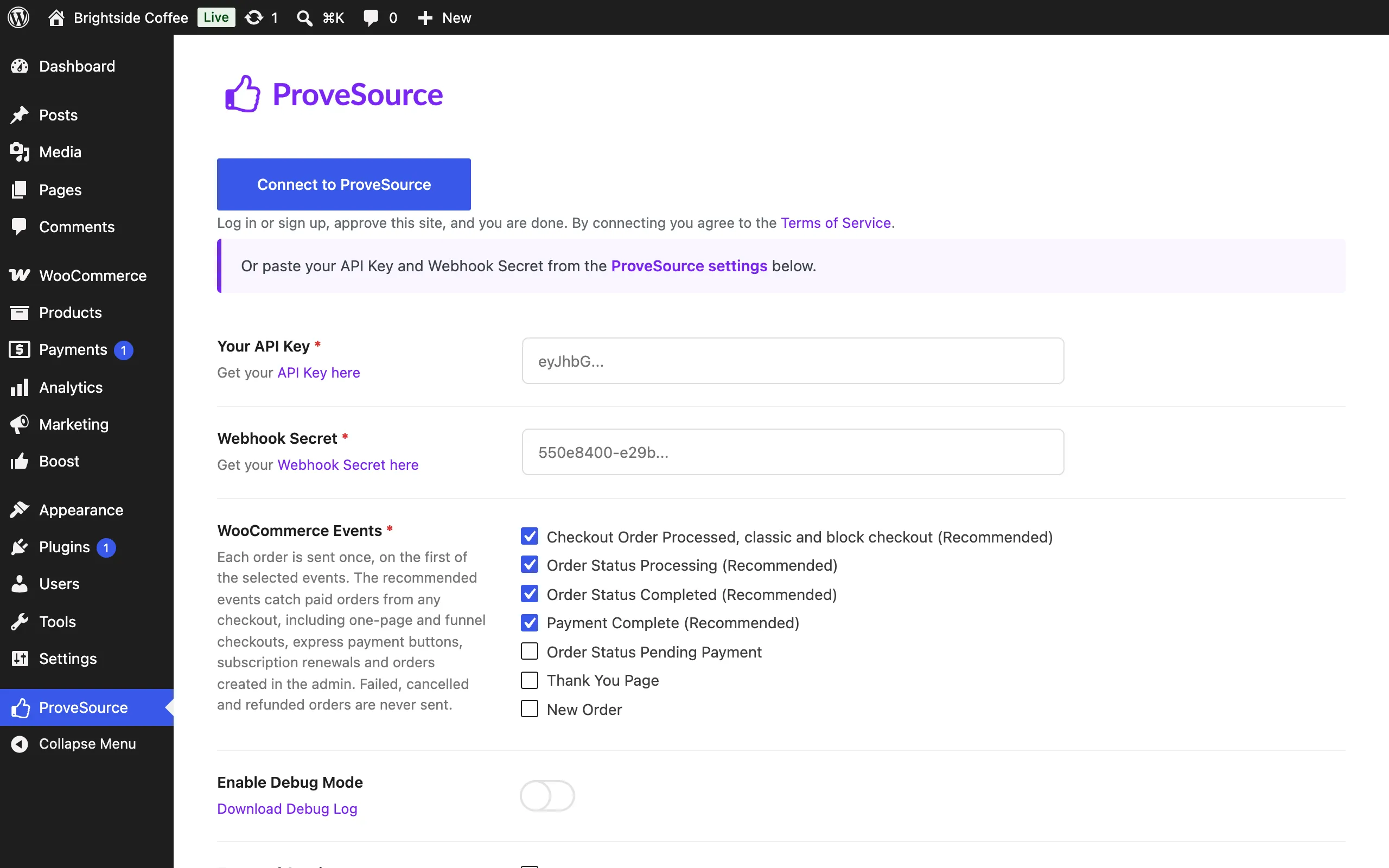
- Click ProveSource in the admin sidebar, then Connect to ProveSource. Log in or sign up for free and approve the site. If you prefer, paste the API key and webhook secret from your ProveSource settings instead.
- Leave the recommended WooCommerce events checked. Each order is sent once, on the first of those events that fires, so checking more never creates duplicates.
- Your last 30 orders are imported when you connect, so the first notification has something to show right away. In the ProveSource dashboard, open Quick create and launch the recent WooCommerce orders notification.
- Open your store. Every notification also has a Preview on my site button that opens your page with that notification showing to you only, and tells you why if it would not show.
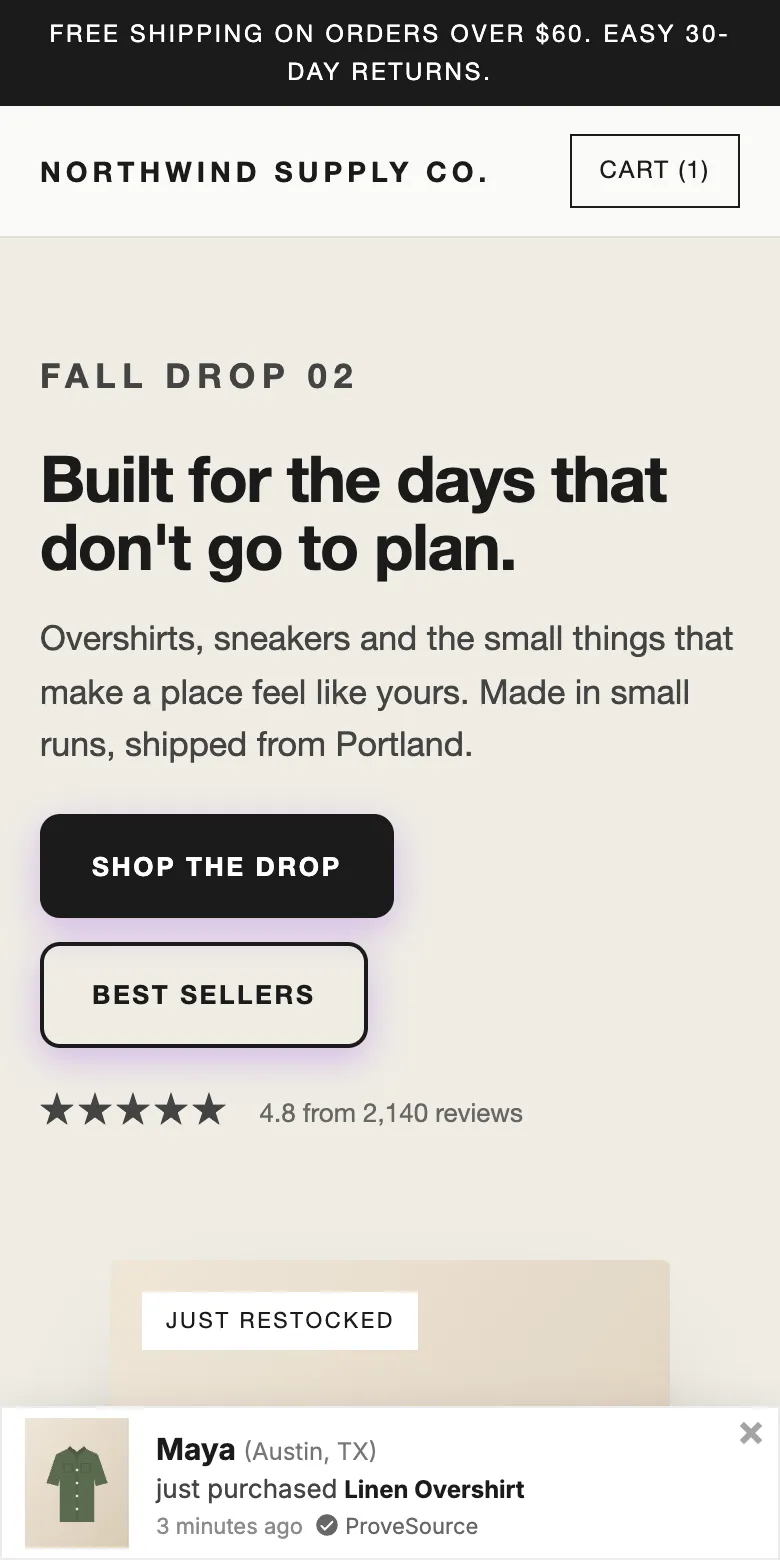
On a phone, notifications show at the top or bottom of the screen so they do not cover the product:
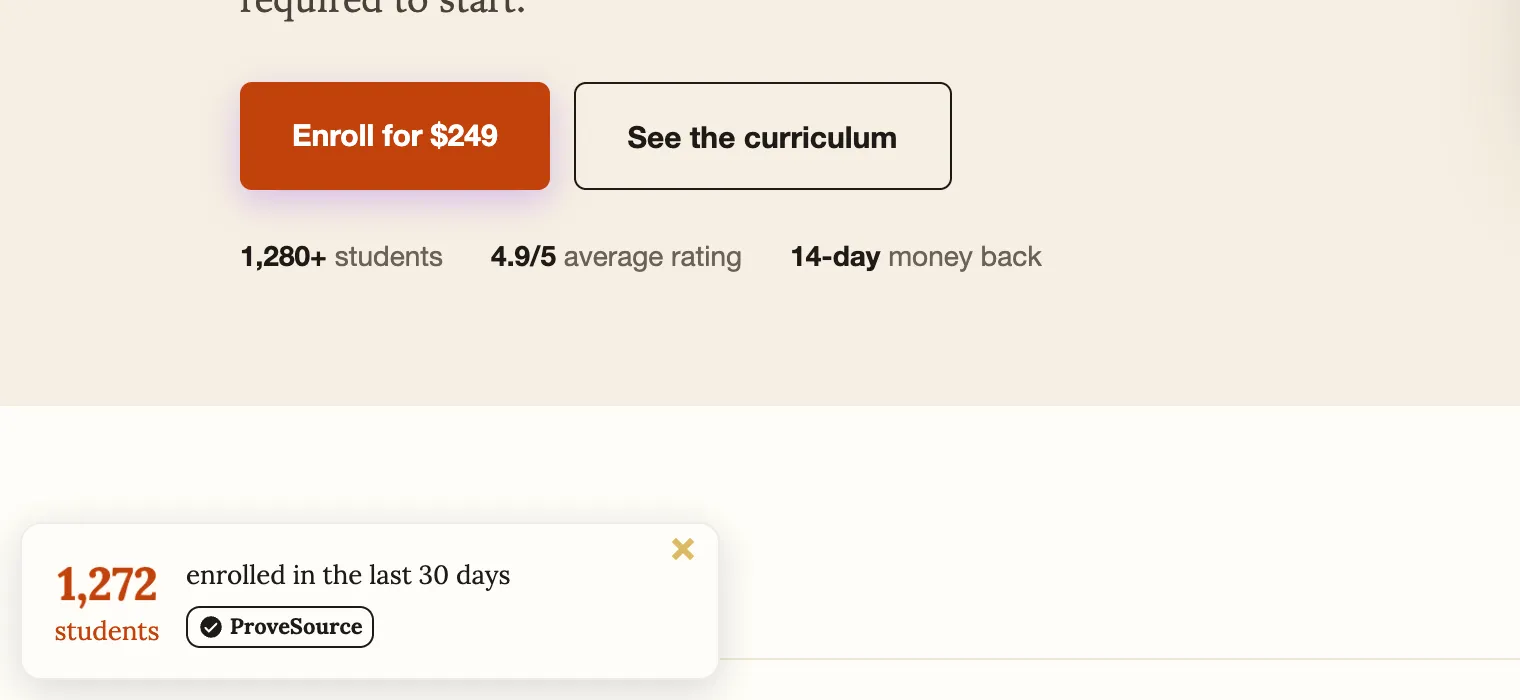
Once sales are showing, add a second notification for reviews or for a total, like orders in the last 24 hours. A count works well on a smaller store, because a day or a month adds up to a bigger number than the last hour.
If you also want popups, spin to win or a free shipping bar, ProveSource Boost has its own WordPress plugin, and it runs on the same account.
Install the free ProveSource plugin or start free on the web. You can see the notifications on a working store first on our demo pages.
Frequently asked questions
What is the best social proof plugin for WordPress?
For a free plugin that runs entirely on your own site, NotificationX. For WooCommerce stores that also want analytics, more data sources and sites outside WordPress, ProveSource. For the lowest monthly price around 10,000 visitors, WiserNotify. All three show real orders.
Is there a free social proof plugin for WooCommerce?
Yes. NotificationX’s free version shows real WooCommerce sales and reviews with no traffic cap. ProveSource is free up to 1,000 visitors a month with every feature. PiWeb and Notivo also have free versions, but they limit real orders (one day of orders on PiWeb, two products on Notivo) and offer invented “virtual” orders.
Should I choose a plugin-native or a SaaS social proof tool?
A plugin-native tool keeps order data on your site and costs nothing a month for the basics. A SaaS tool does the work on the vendor’s servers, adds analytics, and can cover sites and data sources outside WordPress. One WordPress store can do well with either; several sites or sales channels are easier with SaaS.
Can a social proof plugin show fake sales?
Some can. PiWeb, Notivo and SALERT can generate “virtual” or custom orders, and SALERT’s free version shows only invented data. In the US, the FTC treats invented activity as deceptive, so show real orders only.
Do I need WooCommerce for a social proof plugin?
No. Without a store, plugins like ProveSource can show form sign-ups, live visitor counts and reviews. For sales notifications you need a source of orders, which on WordPress is usually WooCommerce.