FOMO App Alternatives (2026): 6 Social Proof Apps Compared on Price and Limits

The short answer
Fomo is the social proof app at usefomo.com. The fomo.com address now redirects to fomo.family, an unrelated crypto trading app. Fomo starts at $25 a month for 8,000 notifications on one website, with a 14-day trial and no free plan outside Shopify. Six apps do the same job. Five of them have a cheaper first paid plan than Fomo. Four have a free plan, and a fifth, TrustPulse, lets brand-new sites start free.
ProveSource is our product, and it is not one of the five cheaper ones: Starter is $29 a month. We would still start with it on most sites, for two reasons. The free plan covers 1,000 visitors a month with every feature, and the limit counts visitors, so a shopper who sees ten notifications uses the same allowance as one who sees a single notification.
Where another app fits better, this page says so:
- A store, a course, a Kajabi site or a SaaS signup page that wants one tool across every page: ProveSource, free up to 1,000 visitors a month.
- A Shopify store with more traffic than that, which only wants sales popups: ToastiBar or Qikify, $6.99 a month with unlimited impressions.
- A WordPress site on a small yearly budget: TrustPulse, $5 a month for the first year, billed yearly.
- Any site that would rather pay $59 a year than run a free plan with a badge: WiserNotify.
Every price and limit below was read on that company’s own pricing page or Shopify App Store listing on 10 November 2026.
Fomo alternatives compared
| App | Free plan | First paid plan | What the limit counts | Works on |
|---|---|---|---|---|
| Fomo (for reference) | Shopify app only: 1,000 notifications a month, 1 website | $25/mo or $250/yr, 8,000 notifications, 1 website | Notifications displayed | Any website, 106+ integrations |
| ProveSource | 1,000 visitors a month, every feature | $29/mo ($24 billed yearly), 20,000 visitors | Unique visitors, impressions unlimited | Any website, Shopify app, WordPress plugin, 100+ integrations |
| TrustPulse | Free start for new sites, up to 500 sessions | $5/mo billed yearly, then $9/mo at renewal, 1,500 visitors, 1 site | Unique visitors | WordPress, Shopify, WooCommerce, Squarespace |
| WiserNotify | No, 7-day trial | $59/yr for 5,000 visitors, or $16/mo for 10,000 | Visitors | Any website, 200+ integrations |
| Nudgify | 1,000 impressions | $9/mo or $90/yr, 10,000 impressions | Impressions | Shopify, WooCommerce, WordPress, Wix, BigCommerce, Magento 2 |
| Proof (UseProof), no longer maintained | No, 14-day trial | $29/mo ($24 billed yearly), 1,000 visitors | Unique visitors | Any website by script |
| ToastiBar | 5,000 impressions a month after the first 14 days | $6.99/mo, unlimited impressions | Impressions | Shopify only |
| Qikify Sales Pop up & Proof | 500 visitors a month | $6.99/mo, unlimited visitors | Visitors | Shopify only |
The fourth column matters more than the price. A plan that counts notifications or impressions runs out faster than one that counts visitors, and how much faster depends on your pages per visit.
Why people leave Fomo
Fomo is a working product with a 4.5 rating from 153 reviews on the Shopify App Store. The reasons to look elsewhere are on Fomo’s own pricing page, and they come down to three things.
The limit counts notifications
Fomo’s pricing FAQ says the plan decides “the number of notifications you can display”. To see what that means for you, multiply your monthly visitors by the notifications a visitor sees in one visit. If each visitor sees four, Starter’s 8,000 notifications cover 2,000 visitors. If each sees two, they cover 4,000. On the free Shopify plan, 1,000 notifications at four per visit is 250 visitors.
Automatic upgrades are on by default
The same FAQ says that when you pass your limit you “will be upgraded to the next plan tier” unless you have turned Automatic Upgrades off. From Starter the next tier is Business at $75 a month. With the setting off, notifications stop until the billing period resets.
Starter covers one website
Starter is limited to one website, and inline display starts on Business. A store with a separate blog, landing page or checkout domain is on the $75 plan from the first day.
None of this makes Fomo a bad choice for a store whose visitors see one or two notifications each. It does mean you should know your notifications-per-visit number before you compare prices.
The 6 alternatives
1. ProveSource
ProveSource shows recent purchases and sign-ups, totals such as “214 people enrolled this week”, live visitor counts and reviews. It reads them from your Shopify or WooCommerce orders, Stripe, forms, webhooks and 100+ other integrations. You can watch it run on a demo store before you sign up.
The free plan covers 1,000 unique visitors a month with every feature and a small ProveSource badge. Starter is $29 a month, or $24 a month billed yearly, for 20,000 visitors and no badge. Fomo’s Starter is cheaper, at $25 a month or $250 a year. The difference is what you get for it: 20,000 visitors with unlimited impressions against 8,000 notifications. The pricing page has the higher tiers.
Over the limit, notifications pause for new visitors until the month resets. Nothing upgrades automatically.
It fits stores, course sites and SaaS products that want one account across a store, a checkout and a marketing site. It does not fit a Shopify store that only wants sales popups for more than 1,000 visitors at the lowest price, where a $6.99 Shopify app costs less. If you are choosing between Fomo and ProveSource only, read the full ProveSource vs Fomo comparison.
2. TrustPulse
TrustPulse’s Basic plan is $5 a month for one site and 1,500 visitors, billed yearly. The pricing page calls this introductory pricing and says renewals are at the full price, which is $9 a month for Basic. Plus is $10 a month for two sites and 10,000 visitors, and Pro is $19 a month for five sites and 25,000 visitors, both before renewal. Removing TrustPulse branding is a Pro feature.
The page also offers a free start for new sites with up to 500 sessions, and a 14-day money-back guarantee instead of a trial.
It fits a WordPress or WooCommerce site with a few thousand visitors whose owner is happy to pay for a year up front. It does not fit anyone who wants monthly billing, and its features page names WordPress, Shopify, WooCommerce and Squarespace without mentioning Kajabi. See our TrustPulse comparison.
3. WiserNotify
WiserNotify’s pricing page says “There is no free plan”. There is a 7-day trial, then Basic at $59 a year for 5,000 visitors a month, on yearly billing only. Pro starts at $16 a month for 10,000 visitors and goes to $40 for 50,000. Every plan allows more than one website.
At the limit it behaves like ProveSource: alerts at 70% and 90%, then notifications pause until the next cycle or an upgrade.
It fits a site with 1,000 to 5,000 visitors a month that prefers one small yearly payment to a free plan with a badge. $59 a year is less than any paid plan Fomo or ProveSource sells. It does not fit if you want to test for longer than a week before paying. See our WiserNotify comparison.
4. Nudgify
Nudgify calls its notifications nudges and prices them by impressions. The free plan is capped at 1,000 impressions, and the pricing page does not say whether that cap resets each month. Lite is $9 a month or $90 a year for 10,000 impressions. Plus is $29 a month for 90,000. All plans work on unlimited websites.
At the limit, nudges stop and start again the next month. The page says “No automatic upgrades”.
It fits a small site with few pages per visit, where 10,000 impressions for $9 go a long way. It does not fit a course site on Kajabi, Thinkific or Teachable, which are not on its integrations page, though Zapier and webhooks are. An impression limit also runs out quickly on a store where people read several pages. See our Nudgify comparison.
5. ToastiBar (Shopify only)
ToastiBar Sales Popup & Proof, by MakeProSimp, is a Shopify app rated 4.9 from 537 reviews. The free plan has unlimited impressions for the first 14 days and 5,000 a month after that, with sales popups, countdown timers and cart, review and low-stock popups. Basic is $6.99 a month with unlimited impressions and no app branding. Analytics start on the $12.99 plan.
It fits a store that lives entirely on Shopify, at less than a third of Fomo’s Starter price. It does not work outside Shopify, so it cannot cover a WordPress blog, a landing page builder or a separate checkout.
6. Qikify Sales Pop up & Proof (Shopify only)
Qikify’s app is rated 4.9 from 598 reviews. The free plan covers 500 visitors a month, which the listing puts at about 5,000 impressions, with sales popups, visitor and sold counts, an announcement bar and a popup. Paid plans follow your Shopify plan: $6.99 a month for Basic Shopify stores, $12.99 for Grow and $19.99 for Advanced, all with unlimited visitors and impressions.
It fits the same store as ToastiBar. Pick between the two on the widgets you want. Like ToastiBar, it is Shopify only. See our Qikify comparison.
Proof (UseProof): still online, no longer maintained
Proof shows up on most lists of Fomo alternatives, so it is in the table above, but we do not count it as one. The product still loads and still takes sign-ups. Its team moved on to other projects in 2019, the footer on useproof.com still reads 2021, and it is not being developed or supported. We wrote up what happened to UseProof separately.
Its pricing page lists a 14-day trial, then Basic at $29 a month, or $24 a month billed yearly, for 1,000 unique visitors, and Pro at $79 a month for 10,000. That is $29 a month for a tool nobody maintains, for the same 1,000 visitors ProveSource covers on its free plan. If you are on Proof today, the Proof comparison covers the switch.
If you want reviews, not live activity
Fomo and the six apps above show what people are doing on your site right now. If what you want is a wall of testimonials or a Google reviews widget, that is a different tool. Shapo, our sister product, collects testimonials and shows them in widgets, free for up to 15 testimonials and $29 a month on Pro. It runs next to any of the apps on this page.
Which one for your platform
Shopify
Start with ProveSource’s Shopify app if you want reviews, live visitors and totals as well as sales popups: it is free up to 1,000 visitors a month and imports your last 30 orders when you install it. If you have more traffic than that and only want sales popups, ToastiBar or Qikify at $6.99 a month is cheaper than ProveSource’s $29 Starter plan, and cheaper than staying on Fomo.
WordPress and WooCommerce
ProveSource’s plugin connects WooCommerce orders to the same free plan. TrustPulse costs less than ProveSource’s paid plan for a small site that pays yearly. For plugins that run entirely inside WordPress, see our comparison of social proof plugins for WordPress and WooCommerce.
Kajabi and course sites
Fomo, ProveSource and WiserNotify all work with Kajabi. With ProveSource you paste the script into Kajabi’s header page scripts and add a Payment Succeeded webhook so each purchase becomes a notification. Kajabi only offers webhooks on its Growth and Pro plans. On a lower Kajabi plan, track the thank-you page URL instead. The steps are on our Kajabi page.
SaaS, landing pages and everything else
You need an app that takes events from Stripe, a form, a webhook or Zapier. ProveSource, Fomo and WiserNotify do. ToastiBar and Qikify do not, because they only read Shopify.
If your shortlist is about free plans only, free social proof tools compares their limits. If you are after countdowns and stock urgency more than activity notifications, see FOMO tools.
How to switch from Fomo
Fomo templates and rules do not load into another app, so a switch is a rebuild. You move three things: the data sources, the notification templates, and whatever history you want visitors to see on day one. These steps use ProveSource. The order is the same for any app.
-
Write down what Fomo is doing today. In your Fomo dashboard, list the integrations that feed it (Shopify, Stripe, Zapier, a form), the templates you run, and the page rules for where each one shows. This list is your migration plan.
-
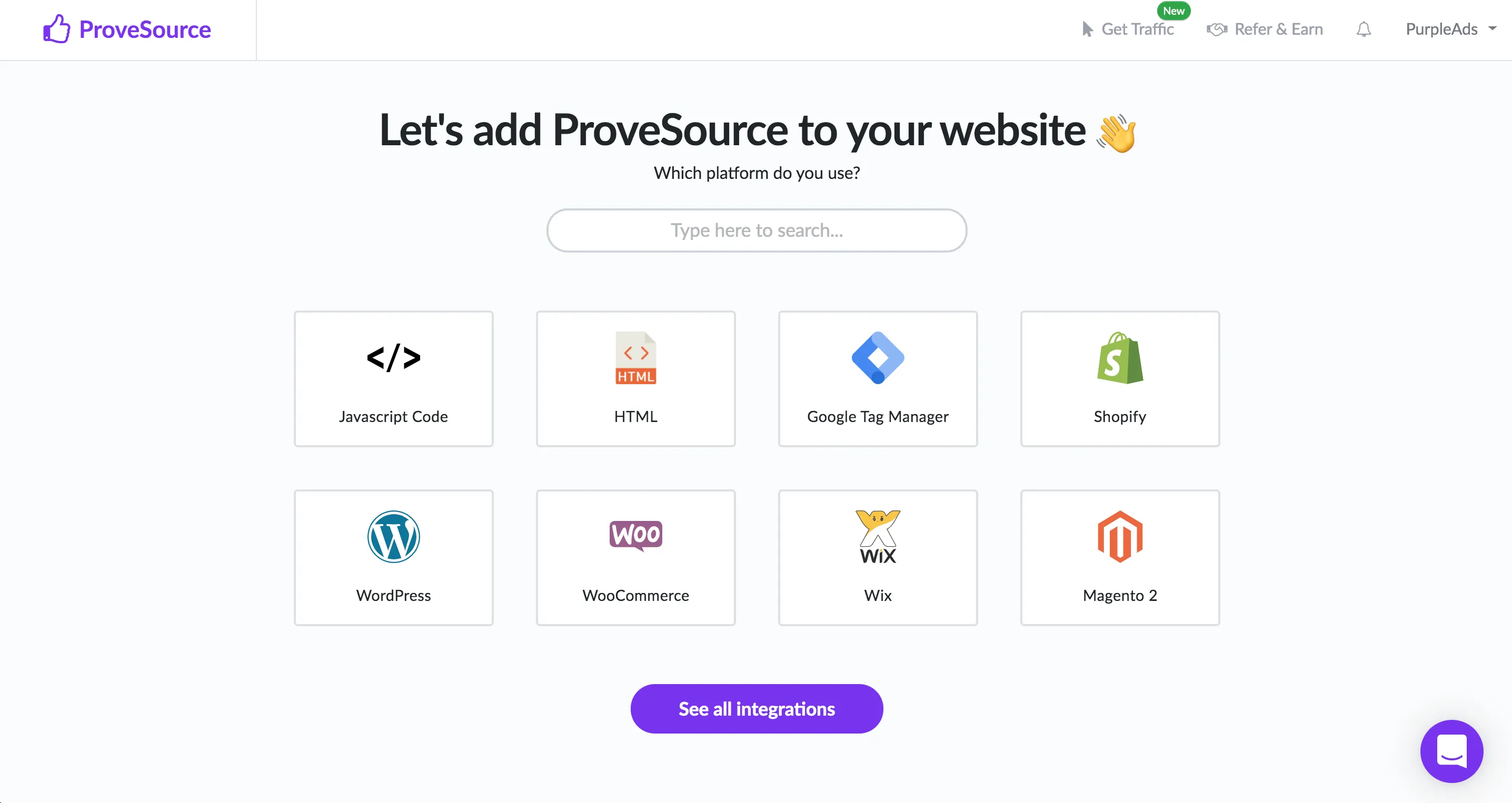
Connect the same sources in ProveSource. Create a free account and choose your platform. On Shopify and WooCommerce, the app or plugin connects your orders for you. For Stripe, Kajabi or a custom checkout, create a Stream notification that tracks webhooks and paste its URL into the tool that sends the events. For a form, point the notification at the form’s page.
-
Rebuild the templates. A Fomo purchase or sign-up template becomes a Stream notification. A Fomo roundup becomes a Combo, which counts activity over 24 hours, 7 days or 30 days. Fomo’s active visitors counter becomes Live Visitors. Recreate the page rules from step 1 as display rules.
-
Bring the history you need. The Shopify app imports your last 30 orders from the past 60 days, which is the limit Shopify sets, and the WooCommerce plugin imports your last 30 orders. If you have little recent activity, a Combo set to all time still has a true number to show.
-
Run both for a day, then turn Fomo off. Check the new notifications in a private window on a product page and on mobile. Then stop Fomo so visitors do not see two popups.
-
Cancel Fomo properly. On Shopify that means uninstalling the app. Switching notifications off does not end the plan. On usefomo.com, cancel the subscription, and it stays active until the end of the billing cycle. If you are close to your notification limit, turn Automatic Upgrades off first, so your last weeks on Fomo do not move you up a tier.
Add a conversion goal for your thank-you page once you are live. It reports how many purchases came from visitors who saw a notification, which is the number that tells you whether the switch was worth making.
Frequently asked questions
Is Fomo free?
Only on Shopify. Fomo’s Shopify app has a free plan for up to 1,000 notifications a month on one website. On usefomo.com every plan is paid after a 14-day trial, starting at $25 a month, or $250 a year, for 8,000 notifications on one website. Checked 10 November 2026.
Is there a free Fomo alternative?
Yes. ProveSource is free up to 1,000 visitors a month with every feature and unlimited impressions, on any website. Nudgify is free up to 1,000 impressions. On Shopify, ToastiBar is free for 5,000 impressions a month and Qikify Sales Pop up & Proof is free for 500 visitors a month. WiserNotify has a trial only.
Which Fomo alternative has the lowest starting price?
The lowest price is free. ProveSource costs nothing up to 1,000 visitors a month, with every feature, and its first paid plan is $29 a month for 20,000 visitors, against Fomo’s $25 for 8,000 notifications. Among paid plans, WiserNotify’s Basic is $59 a year for 5,000 visitors a month and TrustPulse’s Basic is $5 a month billed yearly for 1,500 visitors, rising to $9 at renewal. On Shopify, ToastiBar and Qikify are $6.99 a month with unlimited impressions.
Does Fomo work with Kajabi?
Yes, Fomo lists Kajabi among its 106+ integrations. ProveSource and WiserNotify also work with Kajabi. With ProveSource you paste the script into Kajabi’s header page scripts and send purchases through a Payment Succeeded webhook, which needs Kajabi’s Growth or Pro plan.
What happens when I go over my limit on Fomo?
Fomo’s pricing FAQ says Automatic Upgrades is on by default, so you are moved to the next plan tier when you pass your notification limit. If you turn it off, notifications stop until the billing period resets. ProveSource, WiserNotify and Nudgify pause notifications at the limit and do not upgrade you.
Can I move my Fomo notifications to another app?
Not directly. Notification templates and rules have to be rebuilt in the new app. The data behind them comes from your store or payment tool, so it reconnects there. ProveSource’s Shopify app and WooCommerce plugin import your last 30 orders when you install them, so notifications show from the first day.