Herd Mentality in Ecommerce: How Social Proof Turns Visitors Into Buyers


Herd mentality is the tendency to do what other people are doing instead of deciding alone. In a shop, it is why a queue at the till makes people trust the place. Online, there is no queue. Your visitor is alone on the page, and unless you show them that other people buy from you, your store looks empty even on its best day.
Social proof is how an online store puts the queue back: reviews, best seller labels, order counts and notifications that someone just bought. Which kind you show, and where, decides whether it helps.
What herd mentality means for an online store
Four terms get used almost interchangeably:
| Term | What it describes | On an online store |
|---|---|---|
| Herd mentality | The shopper’s tendency to follow what others chose | Picking the product most people bought |
| Social proof | The visible evidence of those choices | “4.8 stars from 2,140 reviews” |
| Bandwagon effect | Sales speeding up because sales are already high | A best seller that keeps selling because it is labelled best seller |
| FOMO | Worry about missing what others are getting | Ordering during a sale because others are |
Only one of them is yours to change. The herd instinct is already in every visitor. The social proof on the page decides which way it pushes them.
Why online shoppers follow the crowd
In a physical store a shopper can pick up the jacket and feel the fabric. Online, they get photos and a description, and both come from you. If one of two restaurants on a street is full and the other is empty, you probably pick the full one and assume the diners knew something. An order count or a review is the online version of the full restaurant.
There is also the risk of going first. Buying from a store nobody else seems to use raises questions a guarantee badge does not answer: will it ship, will it arrive, will anyone reply if it does not. A notification that someone in Austin ordered the same overshirt three minutes ago answers them directly.
And comparing takes effort. Reading the specs of eight similar products takes an evening, while picking the one with the most reviews takes a second. When products look alike, the crowd becomes the tiebreaker.
The visitor is looking for the only evidence on the page that you did not write.
Herd mentality examples in ecommerce
The common forms:
- Review stars and counts on product cards and in search results. A near-perfect rating can beat a perfect one: the Spiegel Research Center found purchase likelihood peaks at average ratings between 4.0 and 4.7 and drops as ratings approach 5.0.
- Best seller and trending labels on products and collections, and “sort by popularity” as the default order.
- Purchase counts such as “500+ bought in the past month” on marketplace listings.
- “Most popular” labels on SaaS pricing pages, which pull undecided visitors toward one plan.
- Customer totals like “Trusted by 40,000 marketers” next to a sign-up form.
- Recent purchase and sign-up notifications that show one real order or trial as it happens.
- Live visitor counts such as “37 people are viewing this”. These only work when the number is true and means what it seems to. In 2019 the UK’s competition regulator made six large hotel booking sites change their “people are looking at this hotel” messages, partly because the people counted were often searching for different dates.
- Customer photos and user-generated content in product galleries.
Social proof formats and where each one goes
Each format below is shown as it looks on one of our demo pages, running the real ProveSource script. The stores and the names in them are made up.
Recent orders

One order with a name, a place, a product and a time. It speaks to the risk of going first: someone else paid this store minutes ago.
Recent orders are strongest when they match what the visitor is looking at. In a hotel experiment, a card saying most guests reused their towels got 44.1% of guests to do it, against 35.1% for the usual environmental card. In a follow-up, the best card said most guests who had stayed in that same room reused them. Cards naming guests of the same gender did no better than the card that just said most guests reused their towels. What mattered was sharing the situation. On a store, the shared situation is the product page, so show orders of the product being viewed.
On a SaaS site the same notification shows a trial or an upgrade:
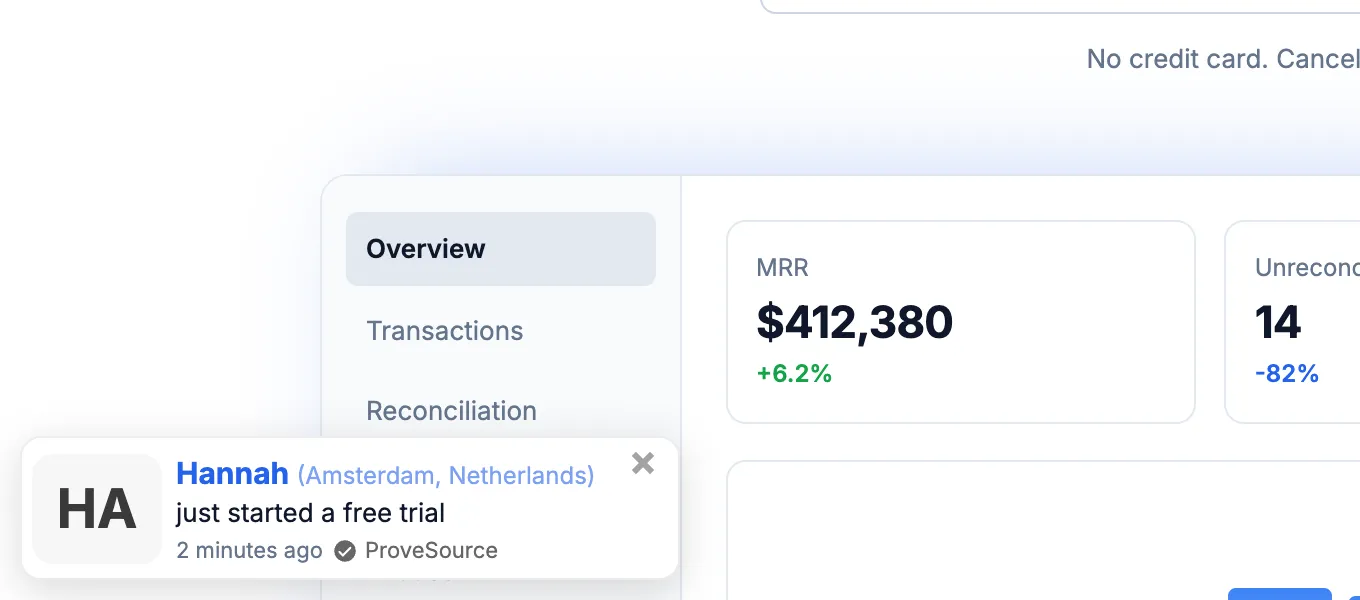
These belong on product, pricing and sign-up pages. A customer’s name and city count as personal data under the EU’s GDPR, so a first name or “Someone” with the city is the safer default, and the product and time do most of the work anyway.
Order counts

A count shows the size of the crowd rather than one person in it. It suits the homepage and category pages, where a visitor is still deciding whether to trust the store at all. The wording follows the business, so a course counts enrolments and a SaaS product counts teams:
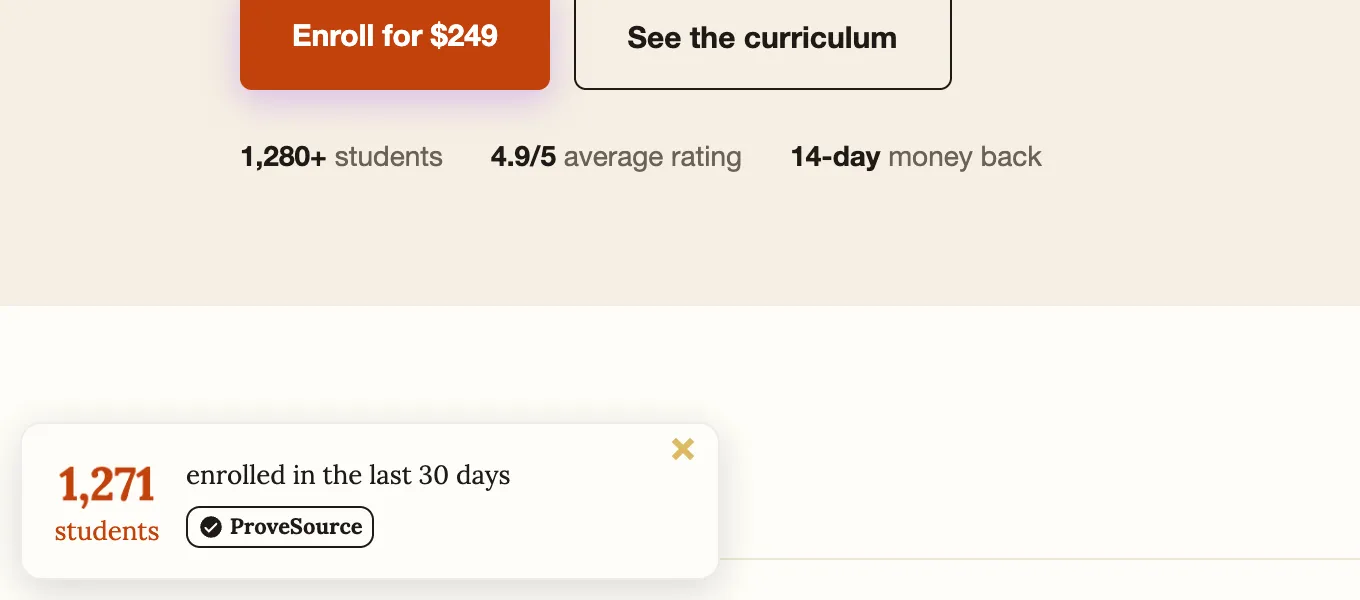
The window decides whether the number helps. Look at your orders over the last 30 days and pick the shortest window that gives a count you would be happy for a visitor to see. A store with 40 orders a month shows a monthly total. A store with 400 can show the last 24 hours.
Visitor counts

A visitor count is the closest thing online to people walking around the shop. “37 people online” on a product page tells a hesitant visitor that plenty of others are looking at the same store right now, and that they are not taking a chance on a place nobody visits.
The bigger the number, the harder it works, so choose the count that gives you a big one. A live count across the whole site shows more people than a count for one page. A count over a longer window shows more again: “1,240 people visited this page today” says the same thing as a live count with a much larger number, and suits pages that get steady traffic through the day. In ProveSource that is the Page Visits notification, next to Live Visitors.
Reviews

Counts show that people bought. Reviews show they were happy afterwards, which is the second thing a shopper wants to know. The Spiegel Research Center found a product with five reviews was 270% more likely to be bought than one with none, with the gain flattening after those first five. Early ratings also pull later ones: in a randomized experiment on comments on a social news site, one early up-vote made the next reader 32% more likely to up-vote too, and those items ended with ratings 25% higher on average.
That makes the first five reviews on each best seller the most valuable ones you will collect. A review request email a week or two after delivery is the usual way to get them. We also run Shapo, a review collection tool, if you want one built for it. Once you have reviews, a review notification carries them to pages that have none of their own, like the homepage, a landing page or checkout.
When social proof works against you
The numbers are too small
“2 people purchased from this store in the last 7 days” is accurate, and it tells the visitor almost nobody buys here.

Pick a longer window, as above, and set a minimum so the count only appears above a threshold. In ProveSource that is “Minimum events to display” on counts and “Minimum active visitors to display” on live counts (how it works). Below the minimum nothing shows.
The activity is for the wrong thing
A visitor looking at running shoes does not care that someone bought a candle. Show activity for the product or category being viewed where you can, and on B2B sites, activity from the same kind of customer.
The activity is old
“Someone purchased 9 days ago” makes a store look quiet. If single orders are sparse, show a count over a longer window instead of old individual orders.
There is too much of it, or it is in the way
A notification every five seconds does not look like a busy shop. It looks like a salesperson following you around the store. Space them out, cap how many one visitor sees per session, and keep them off pages where people read or type, like a long article or the checkout form. On a phone, check that the notification does not cover the add-to-cart button or your chat widget.
Popularity is the wrong message
Some buyers pay for being one of few: limited editions, luxury goods, a made-to-order service. “212 people bought this today” works against the reason they are there. For those products, show reviews and leave out the volume.
The numbers are made up
Invented orders and visitors are a legal problem in the US. The FTC’s rule on consumer reviews and testimonials, in force since October 21, 2024, bans fake reviews and buying fake social media indicators such as bot followers or views. Made-up purchase or visitor activity falls under the FTC Act’s general ban on deceptive practices. Fake feeds are also easy to spot. The same few names repeat, and the count never changes from one day to the next. Once a visitor notices, they stop believing the real notifications too.
How to set it up
- Pick the event that answers the visitor’s doubt. For a store that is an order. For SaaS it is a trial or an upgrade, for a course an enrolment, for a service a booking or a review.
- Connect the real source. Your store platform, sign-up form, payment provider or review sites, so every notification traces back to a real event.
- Choose the format per page. Totals and reviews on the homepage and category pages. Recent orders, reviews and visitor counts on product, pricing and sign-up pages.
- Set windows and minimums. Pick the shortest window that gives a count you are happy to show, and a minimum so a weak number never appears.
- Control the pace. Delay the first notification a few seconds, leave gaps between them, cap how many a visitor sees, and check the layout on a phone.
- Measure it honestly. Compare full weeks before and after, with ads, prices and promotions unchanged. On a store with a few thousand visitors a month, only a large change will stand out from normal week-to-week noise, so give it a month before judging.
Published results are single-site before-and-after numbers, so read them as what happened on that site. LeadFuze added notifications for trial sign-ups, purchases and reviews, and new visitors converting to trials rose 14.2% the following month, with no other experiments running that month.
Questions store owners ask
What is herd mentality in marketing?
It is the tendency of buyers to choose what other buyers chose. Marketing uses it by making those choices visible, through reviews, best seller labels, purchase counts and notifications showing recent orders or sign-ups.
What is the difference between herd mentality and social proof?
Herd mentality is the shopper’s tendency to follow others. Social proof is the evidence that triggers it, such as reviews or order counts. A store cannot create herd mentality, but it decides what social proof its visitors see.
Does social proof work for small stores?
Yes, with the right formats. Reviews and single recent orders work at any size. For counts, pick a window long enough to give a big number, such as visitors today or orders this month instead of people online right now.
Which pages should show social proof?
Product, pricing and sign-up pages get recent orders, reviews and visitor counts, because that is where visitors decide. The homepage and category pages get totals and reviews, which build trust in the store.
Is it legal to show fake purchase or visitor notifications?
In the US, the FTC’s rule on consumer reviews and testimonials, in force since October 21, 2024, bans fake reviews and buying fake social media indicators, and invented purchase or visitor activity falls under the FTC Act’s general ban on deceptive practices. Show only real events.
ProveSource’s free plan covers sites with up to 1,000 monthly visitors with every feature included. For more on the formats, see the guide to social proof notifications. For the design side of steering a choice, read what a nudge means.