22 Best Instagram Marketing Tools to Grow Your Brand in 2026

In this article
- Top Instagram Marketing Tools at a Glance
- What Is an Instagram Marketing Tool
- Why Use Instagram Marketing Tools for Your Brand
- Instagram Scheduling Tools
- Instagram Analytics and Reporting Tools
- Instagram Ads Management Tools
- Instagram Hashtag Finder Tools
- Instagram Stories and Reels Tools
- Instagram Content and Editing Tools
- Social Proof and Conversion Tools for Instagram
- How to Choose the Right Instagram Marketing Tool
- Build Your Instagram Marketing Stack and Start Growing
- FAQs About Instagram Marketing Tools
You’re posting consistently, your content looks good, and your follower count is climbing—but somehow, all that Instagram effort isn’t translating into actual business results. The gap between engagement and revenue often comes down to the tools you’re using (or not using) to manage, optimize, and convert your audience.
This guide breaks down 22 Instagram marketing tools across seven categories—from scheduling and analytics to social proof and conversion—so you can build a stack that turns followers into customers.
⏱️ Key Takeaways
- Instagram marketing tools span seven core categories that address specific business challenges: scheduling (Later, Buffer), analytics (Iconosquare, Hootsuite), ads management (Meta Ads Manager, Smartly), hashtag research (Display Purposes, Flick), Stories/Reels creation (CapCut, Mojo), content design (Canva, VSCO), and social proof conversion (ProveSource, Fomo).
- Consistent posting frequency drives measurable Instagram growth: brands posting 10+ times per week see 79% higher growth rates, making scheduling tools essential for maintaining visibility without manual posting at peak engagement times.
- Social proof tools bridge the conversion gap between Instagram traffic and website sales: displaying real-time purchase notifications and follower counts on your website builds credibility for visitors arriving from Instagram, turning social engagement into revenue.
- Start with three essential tools rather than overwhelming your workflow: one scheduling platform for consistency, one analytics tool for performance tracking, and one social proof solution for converting Instagram visitors into customers on your website.
Top Instagram Marketing Tools at a Glance
Instagram marketing tools cover scheduling (Later, Buffer, Hootsuite), content creation (Canva, CapCut), analytics (Iconosquare, Sprout Social), and engagement (Agorapulse, ProveSource). Each category solves a different problem, so the right mix depends on where you’re spending the most time or losing the most opportunities.
| Category | Top Tools | Best For |
|---|---|---|
| Scheduling | Later, Buffer, Sprout Social, Planoly | Planning and auto-publishing content |
| Analytics | Iconosquare, Hootsuite, Sked Social | Tracking performance and ROI |
| Ads Management | Meta Ads Manager, Smartly, AdEspresso | Running paid campaigns |
| Hashtag Research | Display Purposes, Keyhole, Flick | Boosting discoverability |
| Stories & Reels | Unfold, Mojo, CapCut | Creating short-form video |
| Content Creation | Canva, VSCO, InShot | Designing visuals |
| Social Proof | ProveSource, Fomo, Taggbox | Converting IG traffic on your website |
What Is an Instagram Marketing Tool
An Instagram marketing tool is software that helps you plan, create, publish, analyze, or optimize your Instagram presence. Some tools handle one task really well, like scheduling posts. Others are full-suite platforms covering everything from hashtag research to influencer outreach.
Most tools fall into a handful of categories:
- Scheduling: Queue up posts, Stories, and Reels to publish automatically
- Content creation: Design graphics and edit videos without professional software
- Analytics: Track engagement, follower growth, and which content performs best
- Hashtag research: Find tags that help new audiences discover your posts
- Engagement and conversion: Manage comments and DMs, plus turn followers into paying customers
The point is simple: spend less time on repetitive tasks and more time on work that actually grows your account.
Why Use Instagram Marketing Tools for Your Brand
Managing Instagram by hand gets tedious fast. Between creating content, posting at the right times, replying to comments, and figuring out what’s working, you could easily burn hours each day just keeping up.
Here’s what the right tools actually do for you:
- Save time: Batch-create content and schedule it days or weeks ahead
- Stay consistent: Hit your posting windows automatically, even on weekends
- Make smarter decisions: See which posts drive engagement and which ones flop
- Reach new people: Use hashtag and SEO tools to get in front of audiences who don’t follow you yet
- Turn followers into customers: Connect your Instagram efforts to real business results
Even saving 15 minutes a day adds up to nearly two full workdays per month. That’s time you can put toward strategy instead of busywork.
Instagram Scheduling Tools
Consistency matters on Instagram—posting 10+ times per week can boost growth by 79%. Scheduling tools let you map out your content calendar, preview how your grid will look, and auto-publish so you’re not stuck posting manually at peak times.
Later
Later gives you a visual content calendar with drag-and-drop planning. You can see your entire month at a glance, which makes it easier to spot gaps or plan around campaigns. The Linkin.bio feature turns your feed into a clickable landing page, and bulk scheduling saves time when you’re batching content.
If you care about how your grid looks before anything goes live, Later is built for that.
Buffer
Buffer keeps things straightforward. The interface is clean, scheduling works across Instagram and other platforms, and the free tier is generous enough for small businesses just getting started. The built-in analytics show you what’s resonating without overwhelming you with data.
If you want something affordable and easy to learn, Buffer fits the bill.
Sprout Social
Sprout Social is designed for larger teams. You get publishing queues, approval workflows, and collaboration features that make sense when multiple people touch the same accounts. The reporting goes deep, which helps when you’re proving ROI to stakeholders or clients.
Agencies and marketing teams managing multiple accounts tend to gravitate here.
Planoly
Planoly was built specifically for Instagram, and it shows. The grid preview helps you maintain visual consistency, while auto-posting covers feed posts, Stories, and Reels. The interface is visual-first, so you’re always thinking about how content fits together.
For creators and brands where aesthetic consistency is non-negotiable, Planoly delivers.
Instagram Analytics and Reporting Tools
You can’t improve what you don’t measure. Instagram’s native Insights offer basic data, but dedicated analytics tools go deeper with competitor benchmarking, historical trends, and custom reports.
Iconosquare
Iconosquare provides detailed analytics with competitor benchmarking, hashtag performance tracking, and automated reports you can share with clients or stakeholders. The historical data goes back further than what you get from Instagram directly.
If you want granular performance data and industry comparisons, Iconosquare is worth a look.
Hootsuite
Hootsuite combines scheduling with analytics dashboards, social listening, and ROI tracking across all your social channels. If you’re managing Instagram alongside Facebook, LinkedIn, and Twitter, having everything in one place simplifies your workflow.
Teams juggling multiple platforms often land here.
Sked Social
Sked Social pairs visual planning with detailed analytics and performance insights. The platform works particularly well for eCommerce brands tracking how content drives traffic and sales.
If you’re connecting content performance to revenue, Sked Social makes that connection clearer.
Instagram Ads Management Tools
Organic reach only takes you so far. When you’re ready to invest in paid promotion, ad management tools help you create, manage, and optimize Instagram campaigns beyond basic boosted posts.
Meta Ads Manager
Meta Ads Manager is Instagram’s native advertising platform. You get detailed audience targeting, placement controls, and performance tracking, all free to use (you only pay for the ads themselves).
Every Instagram advertiser benefits from understanding this platform before exploring third-party options.
Smartly
Smartly uses AI-powered creative optimization to test and improve your ad creative automatically at scale. The platform handles campaign management, making it practical to run hundreds of ad variations without manual oversight.
Brands running high-volume campaigns where manual optimization isn’t feasible tend to use Smartly.
AdEspresso
AdEspresso simplifies ad creation with an intuitive interface, built-in A/B testing, and campaign optimization suggestions. The learning curve is gentler than Meta’s native tools.
Small businesses new to Instagram advertising often find AdEspresso easier to navigate.
Instagram Hashtag Finder Tools
The right hashtags help your content reach people who don’t follow you yet. Hashtag tools research and suggest tags based on relevance, competition level, and trending potential.
Display Purposes
Display Purposes is a free hashtag generator that suggests relevant tags and filters out banned or spammy hashtags that could hurt your reach.
For quick, no-cost hashtag research, it’s a solid starting point.
Keyhole
Keyhole offers real-time hashtag tracking with performance analytics and trending tag identification. You can monitor campaign-specific hashtags to see how your branded content spreads.
During product launches or campaigns, Keyhole helps you track what’s gaining traction.
Flick
Flick combines AI-powered hashtag research with collections, performance tracking, and optimal posting time suggestions. The platform helps you find hashtags with the right balance of reach and competition.
For serious Instagram growth strategies where hashtag optimization is a priority, Flick goes deeper than most alternatives.
Instagram Stories and Reels Tools
Instagram’s algorithm currently favors short-form video, with Reels accounting for 46% of time spent on the Instagram app. Stories and Reels tools help you create engaging content without professional video editing skills.
Unfold
Unfold offers premium Story templates and editing tools for polished, brand-consistent Stories. The templates are designed by professionals, so your content looks elevated with minimal effort.
Lifestyle brands and influencers who want a cohesive Story aesthetic often use Unfold.
Mojo
Mojo specializes in animated templates and text effects that make Stories and Reels stand out. You can add motion graphics that would typically require After Effects knowledge.
For eye-catching animation without video editing expertise, Mojo fills the gap.
CapCut
CapCut is a powerful video editor (mobile and desktop) with trending effects, transitions, and audio that match what’s currently performing on the platform. It’s free and surprisingly capable.
When you want Reels that align with current platform trends and sounds, CapCut is a go-to choice.
Instagram Content and Editing Tools
Scroll-stopping visuals don’t require a design degree. Content creation tools help you produce professional-looking graphics and maintain a cohesive feed aesthetic.
Canva
Canva’s drag-and-drop design platform includes Instagram-specific templates for posts, Stories, Reels covers, and carousels. The free tier is robust, and the learning curve is practically flat.
Non-designers who want professional-looking graphics in minutes tend to start here.
VSCO
VSCO is a photo editing app with premium filters and adjustment tools that help you develop a consistent visual style. Many creators use the same VSCO preset across all their photos for instant brand recognition.
If you want a signature editing style that makes your content instantly recognizable, VSCO helps you build that.
InShot
InShot handles both video and photo editing on mobile with trimming, filters, text overlays, and music. When you’re creating content away from your computer, it’s a reliable option.
For quick edits on-the-go, InShot gets the job done.
Social Proof and Conversion Tools for Instagram
Driving Instagram traffic to your website is only half the equation. What happens when visitors actually land on your site? Social proof tools bridge the gap between Instagram engagement and conversions by building trust and urgency at the moment of decision.
ProveSource
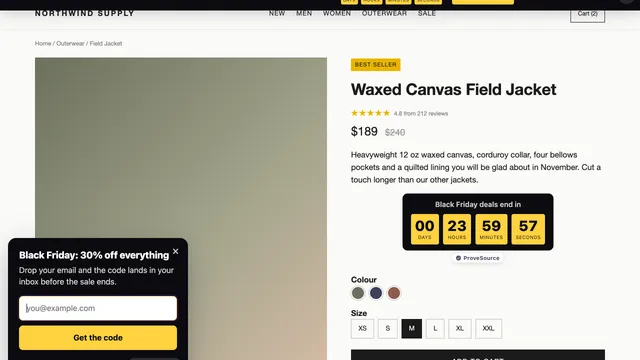
ProveSource displays real-time notifications showing recent purchases, sign-ups, and reviews from your Instagram-driven traffic. When visitors see “Sarah from Los Angeles just purchased this item,” it creates credibility and urgency that can increase conversions.
The platform integrates with Shopify, WooCommerce, and 100+ other platforms where you’re likely sending your IG audience.
Pro Tip: Use ProveSource’s Social Counter widget to display your Instagram follower count directly on your website, reinforcing the social proof you’ve built on the platform.
Fomo
Fomo shows social proof notifications of recent customer activity to create urgency for website visitors. The concept is similar to ProveSource, with different pricing tiers and integration options.
Taggbox
Taggbox aggregates and displays user-generated Instagram content on your website as social proof galleries and shoppable feeds. If customers are already posting about your products, Taggbox helps you leverage that content on your own site.
How to Choose the Right Instagram Marketing Tool
With dozens of options available, picking the right tools comes down to your specific situation. A few questions can help you narrow things down:
- What’s your biggest pain point? Are you struggling with consistency, analytics, content creation, or conversions?
- What’s your budget? Start with free tiers to test before committing to paid plans
- What integrations do you need? Make sure the tool connects with your website platform, CRM, or existing marketing stack
- How technical is your team? Look for no-code setup if you lack technical resources
- What do other users say? Check ratings on Capterra, G2, and app stores
Pro Tip: You don’t need every tool on this list. Start with one tool per pain point and add more as your needs evolve.
Build Your Instagram Marketing Stack and Start Growing
The best Instagram marketing tool is the one you’ll actually use consistently. Rather than overwhelming yourself with a dozen new platforms, start with the essentials:
- One scheduling tool to maintain posting consistency
- One analytics tool to track what’s working
- One social proof tool like ProveSource to convert IG traffic into customers on your website
Small improvements compound over time. Even a modest increase in conversion rate from your Instagram traffic can meaningfully impact your bottom line.
FAQs About Instagram Marketing Tools
Can I use multiple Instagram marketing tools together?
Yes, most Instagram marketing tools integrate with each other or serve different functions. You might use Later for scheduling, Iconosquare for analytics, and ProveSource for converting website visitors from Instagram traffic—all working together without conflict.
Are Instagram marketing tools safe for my account?
Reputable Instagram marketing tools use official APIs and don’t violate Instagram’s terms of service. Choose established tools with strong marketplace reviews and avoid any service promising fake followers or automated engagement, which can get your account suspended.
Do Instagram marketing tools work for small businesses?
Instagram marketing tools are especially valuable for small businesses because they help you compete with larger brands by automating time-consuming tasks—60% of small businesses have attributed their sales growth to Instagram. You get insights that would otherwise require a dedicated social media team to gather.
What is the best free Instagram marketing tool?
The best free option depends on your needs. Buffer and Later offer free scheduling tiers, Canva provides free design templates, Display Purposes handles hashtag research at no cost, and ProveSource has a free plan for adding social proof to your website.
How do I connect Instagram activity to website conversions?
Use UTM parameters on your Instagram bio link and Story links to track traffic in Google Analytics. Then add a social proof tool like ProveSource to display real-time purchase and signup notifications to visitors arriving from Instagram, closing the loop between social engagement and sales.